Alarm clock + wake-up challenge

Turn off your alarm
after your brain wakes up.

WakeMeUp asks a question before the alarm can be dismissed. Helping prevent sleepy shutoffs, endless snoozing, and mornings you barely remember.
No account required Android & iPhone Alarm data stays on device
Placeholder for the WakeMeUp alarm dashboard screenshot
Wake-up challengeMath - Moderate
Next alarm readyWeekdays - 7:00 AM
4free question categories
3difficulty levels
7custom repeat days
0accounts required
Built for difficult mornings

An alarm that does more than make noise

WakeMeUp combines dependable native alarm scheduling with a simple mental challenge and flexible sound choices.

Answer before dismissing

The alarm stays active until the selected question is answered correctly.

One-time or repeating

Set a single alarm, weekdays, weekends, every day, or a custom schedule.

Your sound, with a fallback

Choose a bundled sound, imported audio, or Spotify. A bundled alarm remains available if media playback fails.

Choose the challenge

Select a question category and Easy, Moderate, or Hard difficulty for each alarm.

Native alarm reliability

Android uses exact alarm scheduling and foreground playback. Newer iPhones use Apple AlarmKit where available.

Accessible by design

Readable layouts, larger tap targets, screen-reader labels, and responsive text scaling are built in.
App preview

See what your morning looks like

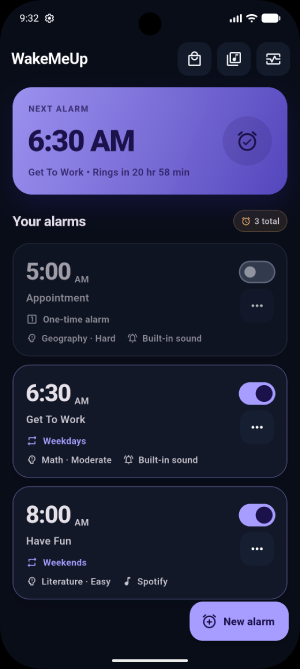
Placeholder for the WakeMeUp dashboard screenshot
Your alarms at a glanceNext alarm, schedule, challenge, sound, and enabled state.
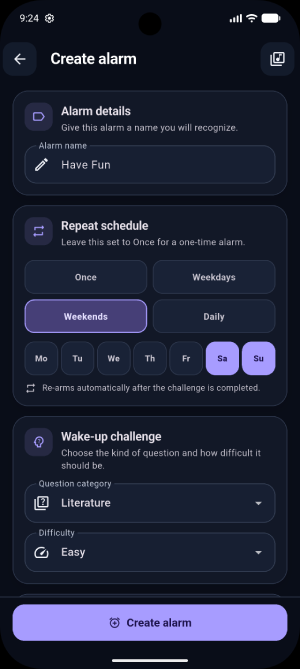
Placeholder for the WakeMeUp create alarm screenshot
Set it your wayTime, repeat days, question type, difficulty, sound, and volume.
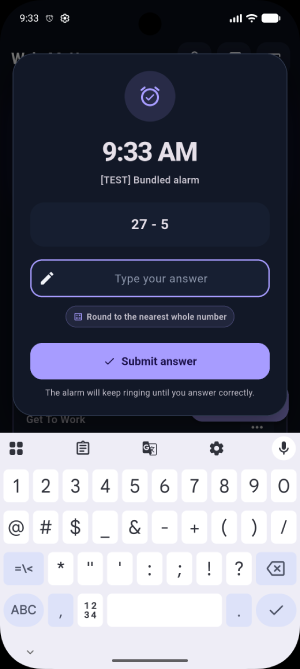
Placeholder for the WakeMeUp alarm challenge screenshot
Wake up and answerA focused challenge screen that cannot be casually dismissed.
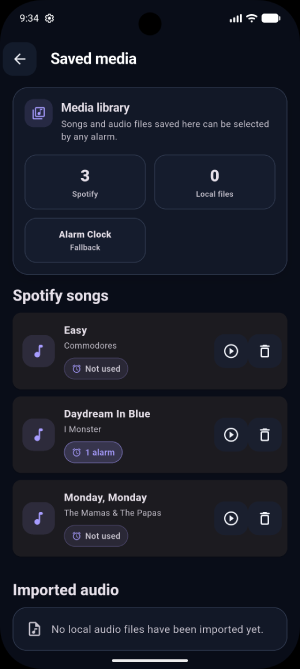
Placeholder for the WakeMeUp saved media screenshot
Manage saved mediaPreview or remove Spotify tracks and imported local audio safely.
How it works

Three steps between sleeping and awake

No signup, cloud account, or complicated routine. Create the alarm and let WakeMeUp handle the rest.

  1. 1

    Create an alarm

    Pick a time, repeat schedule, challenge, difficulty, and sound.

  2. 2

    WakeMeUp rings

    The platform alarm starts at the scheduled time, even when the device is locked.

  3. 3

    Answer to finish

    Solve the question correctly, then the alarm stops and repeating alarms schedule their next occurrence.

Question library

Start free. Add more topics when you want them.

Every category supports multiple difficulty levels. Store pricing is localized by Apple and Google.

Included free

Core questions

  • MathGenerated arithmetic challenges with varied difficulty.
  • LiteratureAuthors, books, poems, characters, and symbols.
  • GeographyPlaces, regions, explorers, and the world around us.
  • AstronomyPlanets, moons, stars, and space science.

More ways to wake up

  • U.S. CapitalsAvailable as a non-consumable purchase.
  • Country CapitalsAvailable as a non-consumable purchase.
  • Monument LocationsAvailable as a non-consumable purchase.
  • MythologyAvailable as a non-consumable purchase.
  • Pop CultureAvailable as a non-consumable purchase.
  • SportsAvailable as a non-consumable purchase.
  • World HistoryAvailable as a non-consumable purchase.

Target U.S. price: about $0.99 per available bundle. Actual price and currency are shown by the device's app store.

Selected alarm sound Here Comes the Sun Spotify - bundled fallback ready
Sound that fits your morning

Bundled alarms, local audio, or Spotify

WakeMeUp lets you personalize each alarm without giving up a dependable backup.

  • Use built-in sounds that are always available.
  • Import an audio file into WakeMeUp's private app storage.
  • Search and save Spotify tracks through the app.
  • If custom playback fails, the configured bundled fallback continues the alarm.

Spotify features require the Spotify app, an authorized Spotify account, network availability, and may require Spotify Premium. WakeMeUp is not affiliated with Spotify.

Platform reliability

Honest expectations for Android and iPhone

Mobile operating systems control alarms differently. WakeMeUp uses the strongest available platform APIs and tells users when a setting may affect reliability.

Android

WakeMeUp uses exact alarm scheduling, a foreground ringing service, lock-screen presentation, and reboot/time-change recovery.

  • Designed to ring while the app is backgrounded or removed from recents.
  • Exact-alarm, notification, and full-screen permissions may need approval.
  • Force-stop and aggressive manufacturer battery restrictions can prevent any third-party alarm app from running.

iPhone

On supported newer versions of iOS, WakeMeUp uses AlarmKit for system-managed alarms. Older versions use a local-notification fallback.

  • AlarmKit provides the best terminated-app and Focus/silent-mode behavior after authorization.
  • Older iOS versions cannot guarantee continuous alarm audio after the app is force-closed.
  • WakeMeUp shows the applicable limitation in the app rather than hiding it.
Privacy-first basics

Your morning routine does not need another account.

Alarm settings, challenge preferences, saved media references, and question data are primarily stored on your device. WakeMeUp does not require an account and does not include advertising or cross-app tracking.

Frequently asked questions

Good things to know before bedtime

The app includes Math, Literature, Geography, and Astronomy questions at no charge. Additional question bundles may be offered as one-time in-app purchases.

No. WakeMeUp is designed to work without a WakeMeUp account. Purchases and Spotify authorization are managed through the applicable third-party account.

WakeMeUp's challenge flow is designed to keep alarm audio active until the correct answer is submitted. Exact behavior can depend on platform permissions and operating-system limitations.

Yes. WakeMeUp supports imported local audio and Spotify selections. A bundled fallback sound is kept ready in case the selected media cannot play.

After the question is answered correctly, a repeating alarm schedules its next selected day. A one-time alarm turns itself off.

No alarm app can guarantee operation in every device state. Use a backup alarm for travel, medication, work, caregiving, or any situation where a missed alarm could cause harm.
Make tomorrow morning different

Set the alarm. Answer the question. Start awake.

WakeMeUp is being prepared for Android and iPhone distribution.

Coming soon to theApp Store Coming soon toGoogle Play
Contact & support

Tell us what is happening

Questions, bug reports, purchase concerns, and feature ideas are welcome. Include your device model and operating-system version when reporting an alarm issue.

Email[email protected]
MailTecDesigns LLC
3470 McClure Bridge Road #1715
Duluth, GA 30096, USA
Self-serviceOpen the support guide
0 / 5000

By submitting this form, you agree that we may use the information to respond. See our privacy policy.